
Pseudorandom
Context
A Rhino plugin for architects to render with AI using material prompts
Pseudorandom lets users describe what they want in plain language, attach prompts to objects, and generate images with respect to spatial context. Additionally, it allows teams to use their own custom rendering workflows.
Problem
Architects using third party AI workflows face legal and ethical risks
Baked into community made ComfyUI workflows are models potentially trained on undisclosed, copyrighted, or nonconsensual datasets, exposing firms to client breach of contract and legal liability.
Earlier iterations of provenance tracking relied on a single free text field where workflow creators could type whatever they wanted about a model's origin.
Solution
The Pseudorandom Vetting Framework
Instead of asking architects to guess if a model is safe, we built an open, centralized provenance repository hosted directly on Hugging Face.
Pseudorandom researches each model and maintains uneditable records that quantify safety across three core metrics:
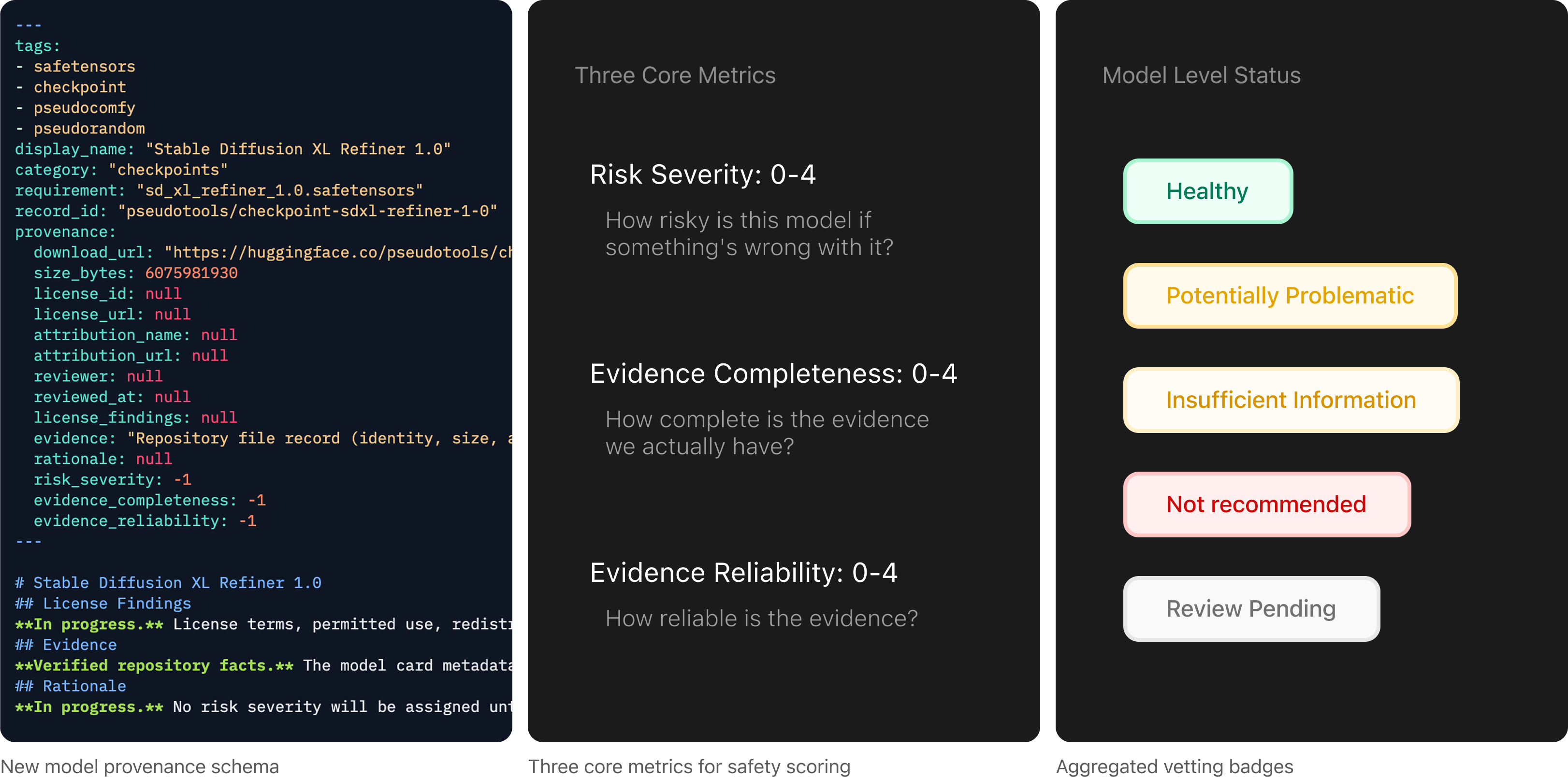
Live model repositories on Pseudotools Hugging Face
This repository serves as the system's single source of truth, dynamically feeding provenance data directly into ComfyUI, Rhino, and final render outputs.
User Flow
An End-to-End Provenance Pipeline
I designed for the provenance details to be carried through the Hugging Face repositories, creating your own workflow in ComfyUI, and even after rendering the image in Rhino.
(Pre-render)
Model Database
Architects browse Pseudorandom-vetted models, review provenance records, and download verified assets directly.
Pseudocomfy Custom Nodes
Within ComfyUI, users create workflows using custom Pseudocomfy model loader nodes that pull models via direct reference to their Hugging Face records.
Workflow Converter
A utility tool scans raw ComfyUI workflows, detects Pseudocomfy nodes, and packages the required metadata payload automatically.
(At-render)
Workflow Information Popouts
Inside Rhino, selecting a workflow displays an aggregated vetting badge. Clicking the popout expands detailed metadata on individual models, licenses, and author attribution before rendering begins.
(Post-render)
Image Lineage
Provenance metadata is embedded directly into rendered image files. Architects can drop outputs into the Image Inspector to verify model lineage for client handoffs or compliance accountability.
Impact
Scheduled for Paper Submission and Exhibit
The model database is live, built on these new records. The packaging step and the image viewer are both shipped and working. Our scientific papers will be submitted end of 2026, and a public exhibition is planned for early 2027.
Reflection
What I've learned
Designing for conscious AI use
I learned the backend of how AI works at the environmental and model development level. The goal is not to shame AI use—it's to design informed use of AI.
Research affords breadth
While I was used to an entire design process that allocated time for each step, exploring academic research allowed me to dig deep into articles, feel things out longer, and explore more before ideating at all.
